Frequently Asked Questions
Payment is made securely at the time of online booking via credit or debit card. This allows us to dedicate our time fully to your session.
Appointments conducted online are held via Zoom. A Zoom link will be sent to you by email and or SMS the day prior to, or the day of, your appointment. Please download Zoom prior to your online appointment at https://zoom.us/download
For in person appointments, the address will be sent once your appointment is confirmed.
You can book your appointment online by choosing the Book Online option from the menu.
I am based on the east coast of Australia and work with clients worldwide. I also offer in person sessions on the Sunshine Coast Hinterland. All other sessions are remote, with consultations via Zoom and energy work done offline. Distance does not reduce effectiveness, as energy transcends space.
No. You do not need a referral from your doctor to attend counselling sessions.
Unfortunately, at this time Medicare does not cover the cost of counselling services.
I have been practicing as a professional counsellor since 2012 and hold the following qualifications/memberships.
- Bachelor of Applied Social Science (Counselling)
- ACA Member (Australian Counselling Association)
You have the flexibility to decide the number and frequency of counselling sessions based on your needs. While certain situations may only require one or two sessions to address your concerns, more complex issues might take months or even years to resolve. Typically, clients attend counselling sessions regularly for a minimum of two to three months.
You can change or cancel your appointment up to 24 hours before your appointment time. A full refund will be provided for appointments cancelled with 24 hours or more notice. For appointments cancelled with less than 24 hours notice, a 50% refund will be provided. There are no refunds if you do not show up for your appointment/session.
How to Reschedule
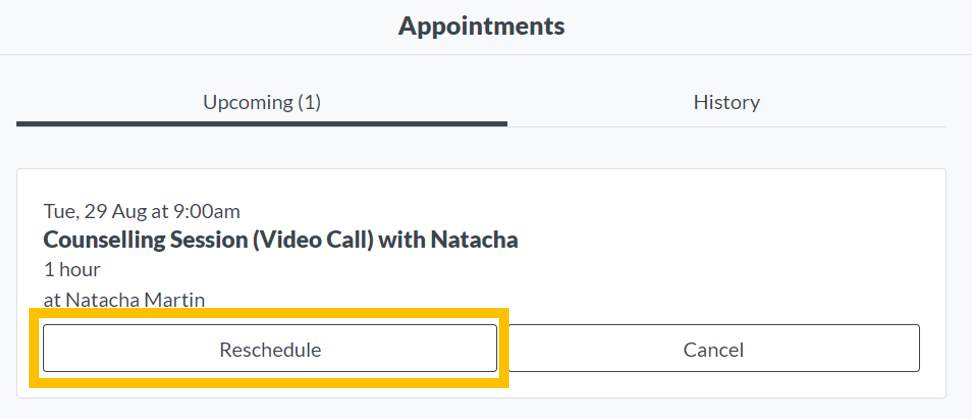
To reschedule your appointment, visit My Bookings and select Manage Upcoming Appointments. Once you have logged in, you will see a list of your upcoming appointment(s). Simply click the reschedule button and choose your new appointment day and time.
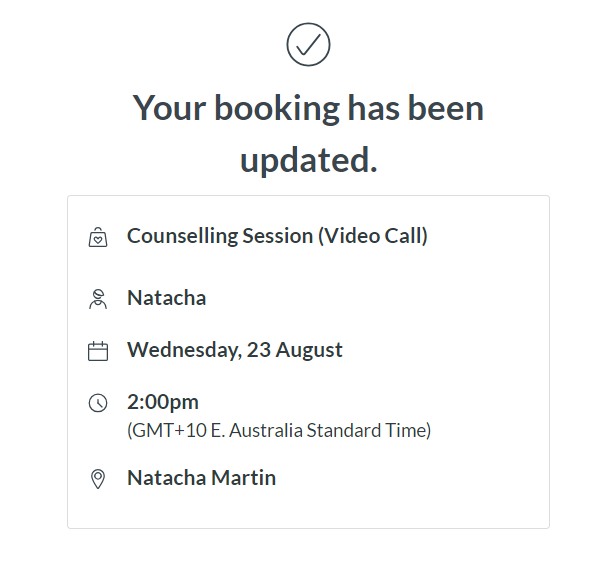
Once you have selected your new appointment time, you’ll see a confirmation message confirming that your booking has been updated.